Create a connection to a new satellite
Use the Connected objects tab to create a new connection from the selected structurally relevant object to a new satellite. Note that the items and names mentioned in the following procedure are examples.
Select an object in the model, for example, a function.
Click
 Properties. The Properties bar opens.
Click the Connected objects tab. The grouped connections are displayed, for example RA(S)CI, which you can use to model responsibilities.
Click the
 right arrow of RA(S)CI to display the connections.
Move the mouse pointer over the connection Informed. The
 Create button is displayed.
Click
Create. The organizational elements are displayed.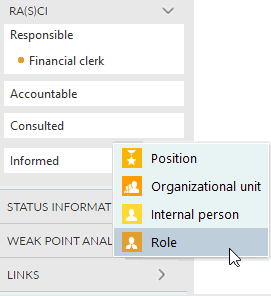
Click Role. The object is inserted and you can enter a name.
Enter Head of department and click Create.
The connection between the selected item and the object is created. The connected satellite is not displayed in the model. The advantage is that the additional information from the satellite is assigned to the function without changing the model layout. You also have the option to display the satellite in the model, if required.